|
|
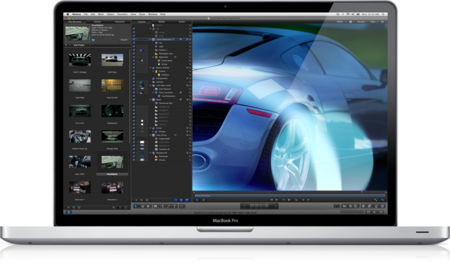
Apple Motion 5.0.3 Mac-OSX | 1.16 GB
Motion is a software application produced by Apple Inc. for their Mac OS X operating system. It is used to create and edit motion graphics, titling for video and film production, and 2D and 3D compositing for visual effects.The Motion interface has been redesigned specifically for Final Cut Pro editors, with a familiar look and feel that makes it easy to switch between the two applications. A new single-window layout puts all the tools you need at your fingertips, and redesigned icons make it easy to identify options at glance. The darker look of the new interface is designed to enhance color perception as you work with any combination of video, stills, and motion graphic elements. Many filters now include onscreen controls for direct, intuitive manipulation of effects. And keyframe editing is much more accessible thanks to a new view that displays the Keyframe editor below the timeline.
Look great in record time.
Motion features new intelligent templates that let you work quickly and flexibly with high-quality effects, titles, transitions, and generators as you edit in Final Cut Pro. Create Smart Motion Templates with any combination of single parameters and rigs, which let you control a group of parameters with a simple slider, pop-up menu, or checkbox. For titles, define fixed durations for intro and outro sections, and Final Cut Pro adjusts the title body to fit the timing in the middle. Or set up templates with multiple aspect ratios to have Final Cut Pro automatically use the correct layout based on the frame size of your footage. Publish templates to Final Cut Pro simply by saving them.
Everything changes. All at once.
Save steps when you抮e working with a large number of parameters. Rigs let you adjust related parameters with a single control ?a slider, pop-up menu, or checkbox. For example, change the colors of all the objects in your project in one step, or apply a complicated logo to a scene with a click. Set up rigs with drag-and-drop ease and change them at any time. Because rigs let you switch quickly among options in real time, they are ideal for Smart Motion Templates used in Final Cut Pro.
A range of options in Motion.
Final Cut Pro includes a rich content library featuring titles, transitions, effects, and generators, most of which are Smart Motion Templates. Open any of these templates in Motion for further customization, then publish your modified template to Final Cut Pro by saving it. The new template is available for use immediately.
Beautiful results with a single click.
Creating chroma keys has never been easier. Just drag and drop the Keying filter for an instant chroma key that is accurate for most projects. If the blue- or green-screen background is unevenly lit, or if there are other problems in the original footage, use onscreen controls and a simple slider to adjust the key color and edge softness. For additional adjustments, instantly access advanced controls, including an intuitive color wheel.
Breakthrough Speed and Quality
64-bit architecture. ColorSync consistency.
Designed to use every bit of the power of Mac OS X and multicore Mac computers, Motion operates at blazing speeds and maintains precise color accuracy at every step.
64-bit architecture
With its new 64-bit architecture, Motion lets you create deeper, more interesting multilayered effects for use in Final Cut Pro.
ColorSync-managed color pipeline
Trust the color consistency across Motion, Final Cut Pro, Compressor, and QuickTime.
Shared Render Engine
Render with consistent performance and pristine quality across Motion, Final Cut Pro, and Compressor.
High-quality rendering
Using the Shared Render Engine, create blurs, scales, and lighting effects in floating-point, linear-light color space ?the same quality found in high-end compositing software.
Resolution independence
Use still images and clips without any size limitation.
Cocoa foundation
See dynamic feedback in a highly responsive interface.
GPU utilization
Create more complex, higher-resolution effects that play in real time.
Grand Central Dispatch
Save time with faster processing for certain functions through the use of all CPU cores.
Download:
http://extabit.com/file/27a35jrdsxk8g/Apple.Motion.v5.0.3.Mac.OSX.part1.rar
http://extabit.com/file/27a35jrdsxh0w/Apple.Motion.v5.0.3.Mac.OSX.part2.rar
http://extabit.com/file/27a35jrdrphps/Apple.Motion.v5.0.3.Mac.OSX.part3.rar
Mirror 1:
http://rapidgator.net/file/6876250/Apple.Motion.v5.0.3.Mac.OSX.part1.rar.html
http://rapidgator.net/file/6876301/Apple.Motion.v5.0.3.Mac.OSX.part2.rar.html
http://rapidgator.net/file/6875738/Apple.Motion.v5.0.3.Mac.OSX.part3.rar.html
Mirror 2:
http://shareflare.net/download/39675.3bc728de1a77364cda2e0dd7a788/Apple.Motion.v5.0.3.Mac.OSX.part1.rar.html
http://shareflare.net/download/34916.315ae36e76bd51f06824c84df288/Apple.Motion.v5.0.3.Mac.OSX.part2.rar.html
http://shareflare.net/download/04918.0e227c8cbe34c691271fdde186cb/Apple.Motion.v5.0.3.Mac.OSX.part3.rar.html |
|



 IP卡
IP卡 狗仔卡
狗仔卡
 提升卡
提升卡 置顶卡
置顶卡 沉默卡
沉默卡 喧嚣卡
喧嚣卡 变色卡
变色卡 抢沙发
抢沙发 千斤顶
千斤顶 显身卡
显身卡