|
|
IMSI Drawing Compare v2.0 | 102 MB
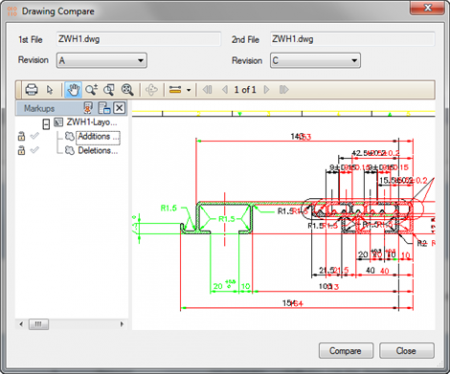
Drawing Compare - a powerful tool that quickly determines the difference between the two CAD-drawings, raster images, or PDF-files. Just choose two images and Drawing Compare them to perform a visual comparison. Drawing Compare, with its unique ability to instantly compare the drawings is now available as a standalone application. Currently, the program allows you to find differences in the 3D-files (and 2D), PDF-files, raster and vector images.
Drawing Compare is a powerful utility that quickly identifies the difference between two CAD drawings, raster images, or PDF files from dozens of different applications. Simply select two drawings and Drawing Compare will perform a visual comparison of the two. Drawing Compare v2, with its unique capability to instantly compare drawing differences visually, is now available as a stand-alone application. So regardless of the design software you employ, this powerful utility is the perfect companion product. Drawing Compare now can compare differences in 3D files, as well as 2D, and has been expanded to compare PDF files, as well as raster and vector images. The new and powerful capabilities of Drawing Compare v2 will quickly become one of your most favorite and essential design tools.
Many Ways to Compare
Locating design variations is easy with Drawing Compare. You can select "Zoom to Differences" to quickly spot updates, or use the new Toggle feature to locate changes. Once you've identified them, there are options to switch from one image to the other, to show only the differences, or to have the differences blink, quickly highlighting where changes have been made. You can even create an animated. Gif of the differences in the two files in order to share these with others.
Multiple Uses
Drawing Compare is an invaluable aid when working collaboratively on a project to quickly see the updates that have been made. You can also use it to compare an 'As Built' drawing to a customized version. Plus it's great when picking up on older projects to note the status of updates.
Key Features
Quickly Locate Changes in CAD Drawings, Raster Images, and PDF files
Locating design variations is easy with Drawing Compare. You can select "Zoom to Differences" to quickly spot updates, or use the new Toggle feature to locate changes. Once you've identified them, there are options to switch from one image to the other, to show only the differences, or to have the differences blink, quickly highlighting where changes have been made. You can even create an animated. Gif of the variations to share.
Supported File Formats
Drawing Compare now can compare differences in both 2D and 3D files. See new features for details. The application has also been expanded to compare PDF files from dozens of different applications, as well as raster and vector images including the following formats.
?DWG (AutoCAD Drawing file)
?DXF (Drawing exchange format)
?SKP (Google SketchUp)
?TCW (TurboCAD)
?2CD (DoubleCAD)
?PDF (Portable document format)
?JPG (Joint photographic experts group)
?PNG (portable network graphics)
?BMP (bitmap)
Download Links
Download Rapidgator
http://rapidgator.net/file/4410894/IMSI.Drawing.Compare.v2.0.rar.html
Download Letitbit
http://letitbit.net/download/85987.822430c27799f8243fb0a4bc45af/IMSI.Drawing.Compare.v2.0.rar.html |
|



 IP卡
IP卡 狗仔卡
狗仔卡
 提升卡
提升卡 置顶卡
置顶卡 沉默卡
沉默卡 喧嚣卡
喧嚣卡 变色卡
变色卡 抢沙发
抢沙发 千斤顶
千斤顶 显身卡
显身卡