|
|
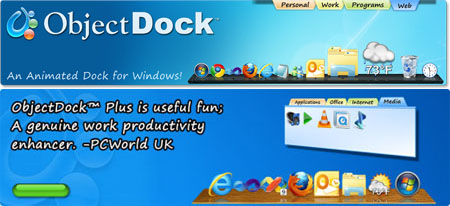
Stardock ObjectDock Plus 2.01.743 | 18.63 MB
If you like the interface of the Mac OS but are stuck using a Windows machine, this little app from Stardock can help--if only very slightly. The premise behind ObjectDock is very simple: it adds an animated, Mac-inspired dock to your desktop that provides easy access to useful shortcuts and serves to replace your taskbar (if you so choose). The ObjectDock install is quick and light, and the program is extremely easy to set up. A simple settings menu lets you choose how many items you want on the dock, where it is positioned, and whether you want zoom enabled. You can also adjust the size, style, and color as well as set it to autohide or remain on top.
Organize with Style
Tabbed docks help keep your weblinks and shortcuts organized. Tuck them away on an edge, setup hotkeys, or leave them in your taskbar. It s easy to customize for your applications.
App Switching Made Better
The best feature of the Windows 7 superbar, now available on all versions of Windows with ObjectDock. Hover over compatible running applications to preview that program s windows and easily switch between them.
Frequent Folder on hand
New in 2.0, put fully-interactive Explorer folder-views in your tabbed docks. Always keep your frequently used folders available and instantly accessible (Windows 7 only).
New UI - Set up your desktop in a snap
Customizing a dock has never been this easy. Focused on helping you adjust the settings you use most, ObjectDock 2.0 s new UI makes configuring multiple docks seamless and natural.
Quickly rearrange, tear off and combine
Drag tabs with your right mouse button to quickly rearrange your tabs, or even tear one off completely onto its own dock. Add, remove, rename and recolor tabs with a simple right-click.
Additional Features
- Position dock on any monitor edge
- Supports multiple monitors
- Adjustable transparency for background and icons
- Running indicators for open programs
- Minimize windows to dock with live minimize-animation
- Compatibility - made for older/slower computers
- Optional auto-hide when a maximized window is in use
- New background blur-behind (Windows 7/Vista only)
Download:
http://extabit.com/file/27a2t66lapqt4
http://turbobit.net/co9buv0o3qsd.html |
|



 IP卡
IP卡 狗仔卡
狗仔卡
 提升卡
提升卡 置顶卡
置顶卡 沉默卡
沉默卡 喧嚣卡
喧嚣卡 变色卡
变色卡 抢沙发
抢沙发 千斤顶
千斤顶 显身卡
显身卡